


Manage Your Learning Business
From One Dashboard
Manage your Learning Hub and monitor site visitors, course sales, student activity, learning progress, and important notifications from one centralized creator dashboard.
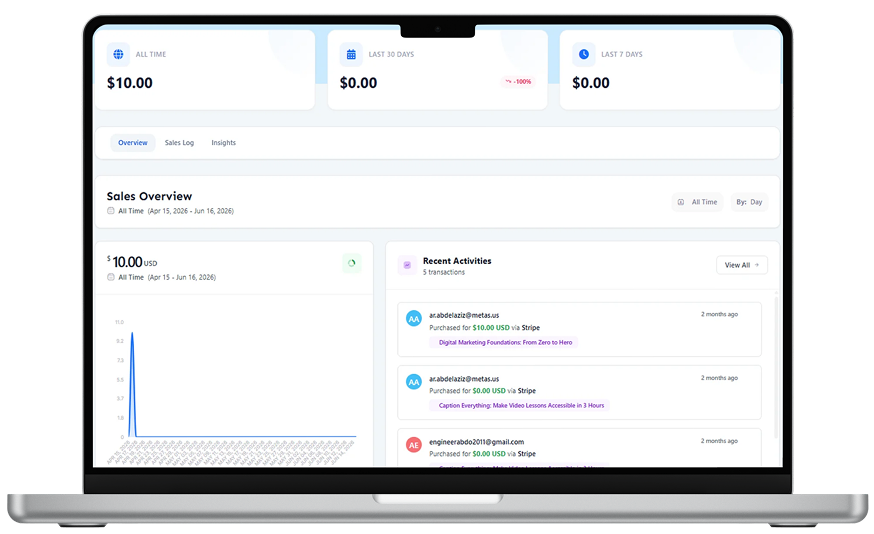


Track and Manage Your Learning Business With Ease.
Your Learmo dashboard gives you one place to manage your Learning Hub, customize website pages, manage courses and students, track sales performance, monitor site visitors, and review important notifications. Everything stays connected and organized in one creator-friendly workspace.
Manage Your Website
From One Place.
Control the key parts of your Learning Hub directly from your Learmo dashboard. Manage website pages, update navigation, adjust branding, review your hub status, and keep your public learning website organized without dealing with external CMS tools, hosting setup, or complicated theme settings.


Track Revenue, Purchases
and Paid Enrollments.
Monitor course purchases, paid enrollments, and sales revenue from your creator dashboard. See which courses are generating sales and follow your learning business’s performance over time.
Understand How Visitors
Explore Your Learning Hub.
See how visitors interact with your Learning Hub by tracking site visits and activity across key pages. Use these insights to understand which content receives attention and make more informed decisions about your website.

Track How Students Move
Through Your Courses.
Monitor enrolled students and understand their learning progress from your Learmo dashboard. View student lists, course enrollments, lesson progress, quiz activity, and completion status, so you can see how learners are moving through your courses and where they may need support.
Stay Updated When
Important Activity Happens.
Stay informed about important activity across your learning business. Review notifications for supported events such as new enrollments and lesson discussions, so you can respond when students need your attention.
Everything You Need to Know
You can manage your Learning Hub, website pages, courses, students, sales information, learning activity, and supported notifications from one connected workspace.
You can monitor supported sales information such as course purchases, paid enrollments, and sales revenue through your creator dashboard.
Yes. Learmo provides supported visitor insights that help you monitor site visits and understand activity across your Learning Hub pages.
Yes. You can review enrolled students and supported learning-progress information, including course enrollment, lesson progress, quiz activity, and completion status.
Yes. Learmo’s student reporting helps creators review supported quiz activity and course-completion information as students move through their courses.
Learmo provides dashboard notifications for supported events across your learning business, such as new enrollments and lesson discussions.
No. The creator dashboard is the private management workspace for the creator. Students use their own dashboard inside the Learning Hub to access courses and track their learning progress.
Ready to build your learning business with Learmo?
Manage your Learning Hub, courses, students, sales, and learning activity from one connected creator dashboard. Use clear business and student insights to understand what is happening across your learning business.
Join Waitlist