


Build and Customize
Your Learning Hub Without Code
Use a visual drag-and-drop builder to edit pages, update sections, customize
your branding, and manage your Learning Hub website without writing code.
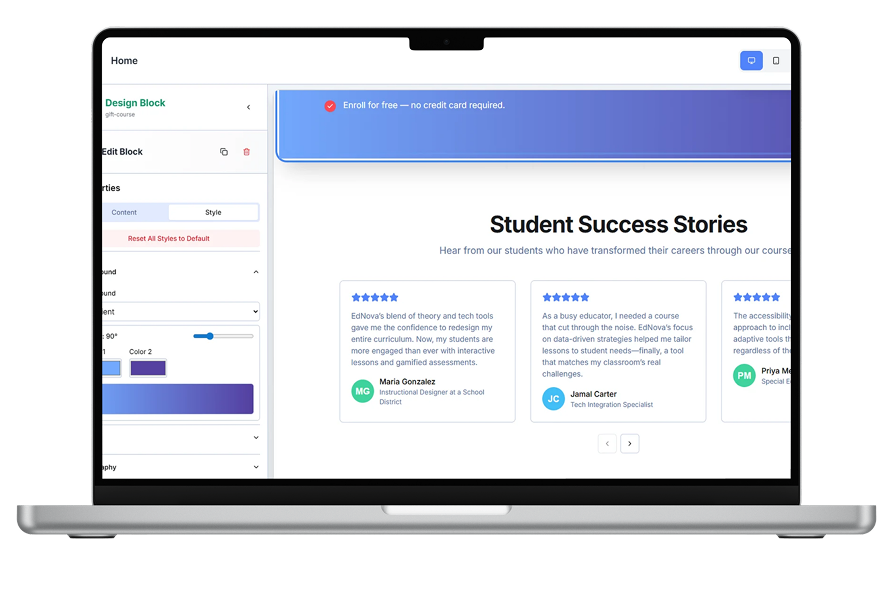


Shape Your Learning Website
Without a Developer.
Learmo’s No-Code Page Builder gives creators a visual way to customize their Learning Hub pages without touching code. Edit content, rearrange sections, adjust navigation, update branding, and manage your learning website through one visual builder designed for creator independence.
Manage Your
Learning Hub Pages
In one place.
Control the public pages your audience sees across your Learning Hub. Edit your home page, courses page, blog, about page, and custom pages using a simple section-based builder, so your learning website stays clear, updated, and aligned with your brand.


Make Your Learning Hub
Feel Like Your Brand.
Customize the visual identity of your Learning Hub without being limited by a generic template. Upload your logo, adjust your brand colors, manage hero images, and refine key page visuals so your website feels consistent, professional, and clearly connected to your brand.
Guide Visitors Through
Your Learning Hub.
Organize how your audience moves across your Learning Hub with simple navigation controls. Manage menu links, connect important pages, highlight courses or blog content, and organize footer links so visitors can easily find the right content, pages, and learning opportunities.


Make Your Pages
Easier to Discover.
Create pages with an SEO-friendly structure from the start. Customize page titles, meta descriptions, URLs, and structured content to help search engines and visitors understand and discover your Learning Hub pages over time.
Build Once.
Look Great
on Mobile, Tablet, and Desktop.
Create Learning Hub pages that adapt across mobile, tablet, and desktop screens. Learmo's responsive page sections help your content stay clean, readable, and easy to navigate, so your audience gets a smooth experience no matter how they visit your site.
Everything You Need to Know
Learmo’s No-Code Page Builder is a visual tool for creating and customizing the public pages of your Learning Hub without writing code. You can edit content, arrange sections, apply your branding, and manage how visitors navigate your website.
No. The builder is designed for creators, educators, coaches, and experts who want to manage their learning websites without coding or depending on a developer for routine updates.
You can customize the public pages supported by your Learning Hub, including your home page, courses page, blog, and other available website pages. The exact page options depend on the features available in your Learmo account.
Yes. You can add your logo, apply brand colors, manage hero images, and customize key page visuals so your Learning Hub reflects your brand.
Yes. Learmo provides navigation controls that help you connect important pages and guide visitors to your courses, blog content, and other Learning Hub destinations.
Yes. Learmo’s page sections are designed to adapt across mobile, tablet, and desktop screens, helping your content remain readable and easy to navigate.
Yes. Learmo lets you manage supported SEO fields such as page titles and meta descriptions through the platform without editing the website’s code.
Ready to build your learning business with Learmo?
Build and customize your Learning Hub without writing code. Manage your pages, branding, navigation, and website content through one visual builder, then use Learmo to create, sell, and manage your learning products from one platform.
Join Waitlist